amp
building websites from my phone

Amp is by far the best coding agent I’ve used. I’ve been using it for a couple of months and want to share my setup and workflow in case it helps anyone get started!
The single best feature for me are Amp’s agent modes. Rather than deciding on the best model and effort level for every task, you match the task to an agent mode: low, medium, high, ultra. You can control this using the dial.

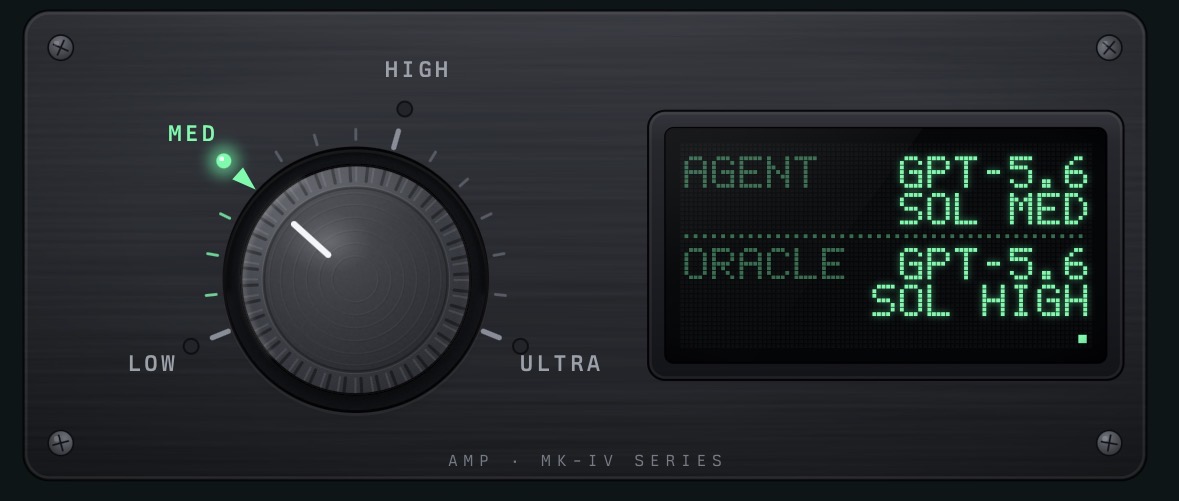
The Amp team does the hard work of selecting (and updating) the right models and thinking levels for each tier. Up until now I’d have kept up with model releases and tuning reasoning but I don’t need to any more.
Setup
It took a couple of days to get my setup to where I wanted it. YMMV and I’d encourage you to experiment and play around with the different features and ways of running Amp (terminal, desktop and mobile).
The next best thing about Amp is orbs. Orbs are essentially managed sandboxes for your agent that run remotely and can be driven from the Amp console or TUI. Orbs have been a game-changer for how I work. I can fire off multiple agents walking down the street and check on them when I get to the pub!
I mostly launch Amp threads from my phone. Just go to ampcode.com and save it to your home screen to use the PWA.
I pay $20 a month for a subscription that gives me a set amount of credits and orb usage, and I can top-up with additional credits if I go over. It feels like my phone contract, which is nice!
Each Amp project can be linked to a GitHub repository, which makes git operations fade into the background.
I have a simple AGENTS.md file to guide the agent’s behaviour and that’s it! No need for skills so far. Orbs can also be configured with a .agents/setup file.
Workflow
My typical workflow has settled to something like this:
- file issues in the GitHub repo
- ask puck (Amp’s built-in, general purpose assistant) to check open issues and orchestrate agents, reporting back with progress
- watch agents launch in orbs and implement features, update docs and run tests
- open a preview of the website, deployed by the agent to Amp’s infra
- prompt the agent with small iterations to complete the work
- ask the oracle to review
- run the ship command to merge changes to main (trunk-based dev, no branches)
- deploy to a Fly machine (via GitHub app)
I find myself looking at the code less and less, and when I do it looks as I would have expected!
Extras
Some other handy extras I’m not directly using day-to-day:
- terminal - each orb has a terminal for direct access
- diff comments - you can review the agent’s changes via the console and make comments just like a GitHub PR review
- local sync - start an agent in an orb and continue via the TUI
- event driven orbs - wake orbs up in response to external triggers, like new issues
- multiplayer - collaborate on threads in orbs with teammates
Delegating to the harness
I don’t worry about the same things as I do when using Claude Code:
- context management
- cost optimisation
- compaction
- permissions
- sandboxing
- skills
This all feels handled for me by Amp. The quality of output is amazing and I rarely feel I need to over-steer or correct the agent.
And the best bit: Amp changes all the time. The team behind it is constantly shipping killer features and cutting deadwood. Contrast that with Claude Code which has been accumulating features for too long and has several ways of doing the same thing - the onus is on the user to figure out the optimum flow.
Amp works the way I except it to, before I know what that is!
Thanks for reading!